Best WooCommerce Order Tracking Plugins: Top 5 Compared
WooCommerce marks an order as “completed” and then goes quiet. Out of the box there is no tracking number field, no carrier link and no delivery status, so every parcel you ship can turn into a “where is my order?” email. A WooCommerce order tracking plugin closes that gap: it stores the tracking number, maps it to the right carrier and shows shipment tracking to the customer in order emails, in their account and on an order tracking page.
Below are five of the best WooCommerce order tracking plugins, compared by what they actually do, which carriers they cover and what they cost.
Why your WooCommerce store needs order tracking
Order tracking is not a nice-to-have feature for a store that ships physical goods. It does three concrete jobs:
- It removes WISMO tickets. “Where is my order” requests are the single most common support topic in e-commerce. When customers can check shipment tracking themselves, those messages mostly stop arriving.
- It catches delivery problems early. A parcel stuck at a sorting hub or waiting unclaimed in a pickup point is visible in the tracking feed days before the customer complains or opens a dispute.
- It protects payments. Payment providers increasingly expect a tracking number attached to an order; having one makes chargeback and dispute cases much easier to win.
There is also a retention argument. Post-purchase messages — “shipped”, “out for delivery”, “ready for pickup” — are read far more often than marketing campaigns, which makes the tracking flow one of the few touchpoints customers genuinely want.
What to look for in a WooCommerce order tracking plugin
Most plugins in this category look similar on a feature list. These are the differences that matter once you ship daily:
- Where the tracking number comes from. Some plugins only give you a field to paste a number into; others create the shipping label and receive the tracking number automatically. Manual entry costs about a minute per order — multiply that by your daily volume.
- Real carrier integration vs. a tracking link. A link to the carrier’s own site is the cheapest form of order tracking, but it sends the customer away from your store. An API integration pulls real statuses back into WooCommerce, where you can act on them.
- Carrier coverage in your markets. A plugin with “1,000+ carriers” usually means 1,000 tracking URL templates. Check that the couriers you actually use are supported through an API, not just a link.
- Customer-facing tracking. Tracking in order emails, in My Account, on a dedicated order tracking page, or as a guest lookup form — decide which of these you need before you pay for a licence.
- Bulk workflow. Importing tracking numbers via CSV, updating order statuses automatically and printing labels in batches are what separate a plugin for 10 orders a day from one for 500.
- Cost model. Flat annual licence, per-shipment pricing or a free tier with limits — all three exist in this list.
Quick comparison of the best WooCommerce order tracking plugins
| Plugin | Best for | Starting price | Adoption |
|---|---|---|---|
| SmartyParcel | Carrier integrations, labels and tracking in one plugin | Free plugin, platform plans by usage. Best quote for small businesses (from $5) | 7,000+ installs |
| Advanced Shipment Tracking (Zorem) | Free tracking fields plus automated status emails | Free; AST PRO $129/year. For real-time tracking sync you need TrackShip service additionaly | 70,000+ installs |
| YITH Order & Shipment Tracking | Simple tracking codes with a long carrier list | Free; premium $69.99/year | 7,000+ installs |
| Shipment Tracking (official Woo extension) | A minimal, officially supported option | $59/year | 50,000+ installs |
| AfterShip Tracking | Branded tracking page and notifications | Paid from $9/month per 100 shipments | 7,000+ installs |
Top 5 WooCommerce order tracking plugins
1. SmartyParcel — order tracking and e-commerce shipping automation platform
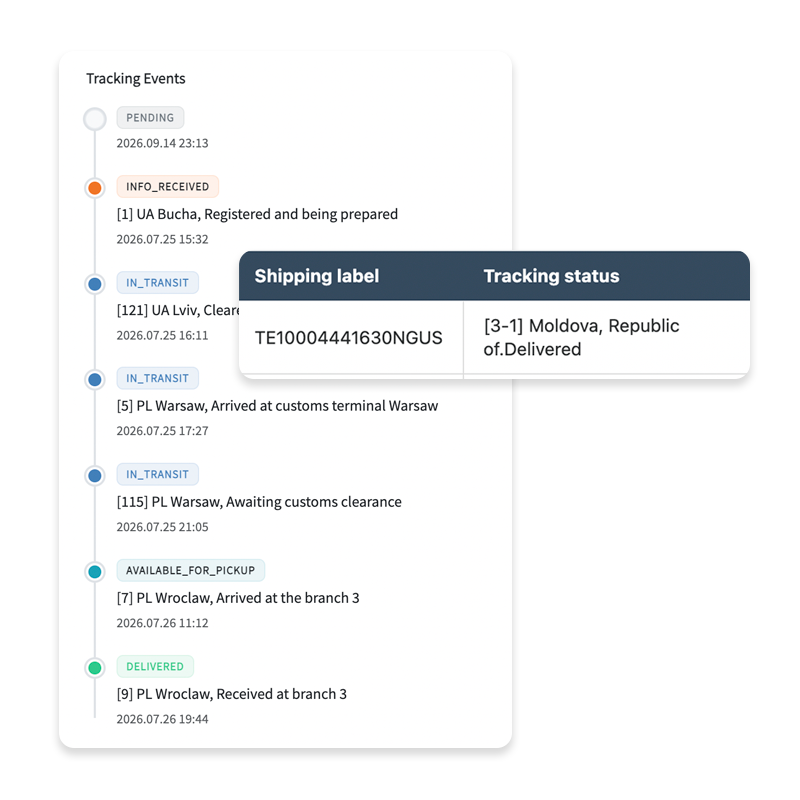
SmartyParcel is a WooCommerce shipping plugin built on top of a logistics platform, and order tracking is the last step of a chain it handles end to end: pickup points at checkout, live carrier rates, shipping labels, then shipment tracking. Merchants can use plugin both for full shipping automation or only for shipment tracking.
From there SmartyParcel pulls status updates directly from the carrier API and surfaces them as order tracking your customers can check themselves, from label creation through to pickup or delivery. Statuses are also visible in the WooCommerce admin, so delivery exceptions are easy to spot before anyone emails you about them, and shoppers get one parcel tracking page instead of a link to a courier’s website.
What it does if we speak only about tracking solution
- Carrier API tracking for Nova Post, Nova Global, Ukrposhta, Meest, DHL, GLS, PostNord, InPost, Rozetka Delivery and other top carriers worldwide.
- Customer notifications via email or SMS about shipment transit. As example you can setup automatic SMS notification after shipment was delivered.
- Powerful shipping and tracking automation rules. Change order status if shipment was created or add custom order notes about shipping process. Both of them but not only you can easly configure using SmartyParcel.
- You can choise your preferred workspace - using our web app or directly inside WordPress admin.
Price: the plugin is free on WordPress.org (7,000+ active installations, rated 4.6/5); the platform behind it has a free tier and usage-based plans — see the pricing page for current rates.
Best for: stores that want to fully automation their shipping workflow where all of tools work together inside one place.
Download the SmartyParcel plugin from WordPress.org or read how to connect your WooCommerce store to SmartyParcel.
2. Advanced Shipment Tracking (AST) by Zorem
AST is the default answer in most WooCommerce forums, and with good reason: the free version is generous and it is installed on more than 70,000 stores. It adds a tracking number and carrier field to the order, generates the tracking link, marks the order as shipped and sends the customer a tracking email — all without a licence key. It is compatible with High-Performance Order Storage and the new cart and checkout blocks, and it plays well with label tools such as ShipStation, Sendcloud or Printful, picking up the tracking numbers they write to the order.
The paid tier, AST PRO, adds the heavier fulfilment features: around 950 carriers with auto-detection by tracking number format, item-level partial shipments, CSV/FTP imports, a REST API and PayPal and Stripe tracking sync. Zorem lists AST PRO at a flat $129 per year with no per-shipment fees.
Keep in mind: AST tracks the number, not the parcel. It does not create labels and does not pull live delivery statuses from carrier APIs on its own — live monitoring is a separate add-on.
Best for: stores that already generate labels somewhere else and just need clean tracking fields and simple automation functions.
3. YITH WooCommerce Order & Shipment Tracking
YITH takes the simplest possible approach to WooCommerce order tracking: you add a carrier, a tracking code and a shipping date to the order, and the plugin builds the tracking link, shows it on the order details page and includes it in the shipping confirmation email. The free version on WordPress.org already covers hundreds of carriers worldwide, which is often enough for a store that ships a few parcels a day with one or two couriers.
The premium version, listed at $69.99 per year, adds things like custom carriers, an order tracking page shortcode, guest lookup by order number and better formatting of the tracking information in emails.
Keep in mind: like AST, this is tracking-number bookkeeping rather than a carrier integration — statuses are not pulled back into WooCommerce, and multiple tracking numbers per order are limited.
Best for: small stores that want a tidy, well-documented plugin from a known vendor and do not need live delivery statuses.
4. Shipment Tracking — the official WooCommerce extension
The official extension from the WooCommerce marketplace is the most conservative choice on this list: you add a carrier and a tracking number to an order, and the tracking information appears in order emails, on the order tracking page and in the customer’s account view. It ships with a set of built-in providers — Australia Post, Canada Post, DHL, DPD, FedEx, Royal Mail, TNT Express, Polish carriers and others — and lets you define custom ones.
It costs $59 per year and is installed on 50,000+ stores. What you buy is compatibility and support from the WooCommerce team rather than features: there is no bulk import, no automation and no delivery status monitoring, so every order is handled manually.
Keep in mind: at this price, the free AST plugin does more. The argument for the official extension is strictly first-party support.
Best for: low-volume stores that prefer everything to come from the WooCommerce marketplace.
5. AfterShip Tracking
AfterShip approaches the problem from the post-purchase side. The WooCommerce plugin syncs orders to an AfterShip account, which monitors shipments across a very large courier network (900+ in the plugin, 1,200+ on the platform) and turns the raw carrier data into a branded order tracking page, email and SMS notifications, and delivery analytics. It is the strongest option here if the tracking experience itself is part of your brand.
Pricing is per shipment: the free plan covers a small monthly volume — enough to try it on a slow month — and paid plans start around $9 per month, scaling with the number of tracked parcels.
Best for: D2C brands that want a polished, branded tracking page and automated delivery notifications.
Which WooCommerce order tracking plugin should you choose?
There is no single winner, but the decision is usually easy once you know where your tracking numbers come from:
- You want to quickly integration tracking solution with full-shipping automation in future - SmartyParcel for WooCommerce, is your choise.
- You already have a label tool — Advanced Shipment Tracking, free, is the obvious companion.
- You ship a handful of parcels a week — YITH or the official Shipment Tracking extension are enough.
- The post-purchase experience is a marketing channel for you — AfterShip gives you the branded tracking page and notification flows.
And whatever you install, make sure customers can find their parcel in one place. If you need a quick check without logging into a carrier dashboard, our universal parcel tracking page works with any tracking number from the supported carriers.
FAQ
Not really. WooCommerce has order statuses such as processing and completed, and an order lookup form, but there is no tracking number field, no carrier link and no delivery status. Shipment tracking always comes from a plugin or an extension.
Yes. Advanced Shipment Tracking and YITH both have free versions in the WordPress directory, AfterShip has a free plan with a monthly shipment limit, and the SmartyParcel plugin is free to install, with usage-based plans on the platform side.
Depending on the plugin: through a tracking link in the shipping confirmation email, in the order list under My Account, or on a dedicated order tracking page where they enter an order number or tracking number. Guest customers need an order tracking page or a lookup form, since they have no account.
Order tracking covers the whole order lifecycle in your store, including payment and fulfilment stages. Shipment tracking starts when the parcel is handed to the carrier and follows it to delivery. Most WooCommerce plugins in this category do shipment tracking and display it as order tracking to the customer.
Yes, and that is the point of a multi-carrier plugin. SmartyParcel, for example, connects Nova Post, Ukrposhta, Meest, DHL, GLS, PostNord, InPost and Nova Global through one integration, so labels and tracking for all of them live in the same WooCommerce screen.